


This post was created in partnership with Intuit. All opinions and observations are our own.
For a long time, many businesses found QuickBooks Online’s lack of bill approval a major drawback. It was one of the main reasons teams went looking for a separate AP tool. That has changed. With the Elite bill pay tier, approval workflows are now built directly into the platform.
We recently walked through a full demo of these new features. You can watch the full video here:
Here is a breakdown of what was covered.
The Bill Pay Tiers
QuickBooks Online bill pay comes in three levels: Basic, Premium, and Elite.
Basic is free and covers standard bill entry with a limited number of ACH transactions. Premium adds more ACH volume, 1099 filing support, and faster processing speeds. Elite removes per-transaction ACH fees and, most importantly, unlocks custom approval workflows and role-based permissions. For current pricing on each tier, visit Intuit’s bill pay pricing page.
Approval Workflows: The Feature People Have Been Asking For
This is the big one. With Elite, you can build approval rules based on bill amount, vendor, or other conditions (see graphic).
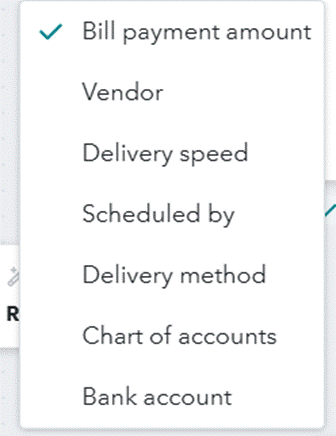
Bills under a set of criteria move forward automatically. Anything meeting the criteria gets routed to a designated approver. You can set up different workflows for bill entry and bill payment. This creates a clear separation of duties in your team.
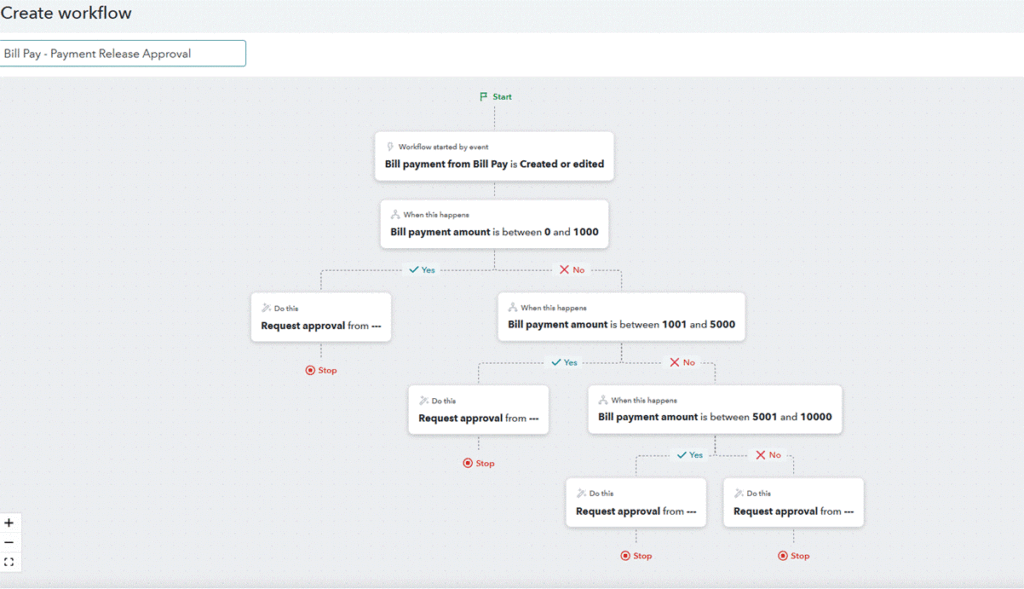
Approvers are notified through a task in QuickBooks or by email. Anyone acting as an approver does need to be set up as a QuickBooks user, but there is a specific bill approver role that limits their access to just that function. This bill approver role provides no access to reports, invoices, or anything else outside of accounts payable.
AI-Assisted Bill Entry and Other Improvements
QuickBooks has continued improving its AI-assisted data extraction, and the progress is noticeable. The system can now read uploaded invoices, including handwritten details and photos of paper bills, and populate the bill fields automatically. There is also a new toggle to choose between a single summarized line item or a full itemized breakdown, which was not an option the first time we tested QBO bill pay.
Some of these features are still in beta, so we expect features to continue to evolve. A few other practical additions worth noting from the demo:
- Duplicate bill detection
- Overdue payment warnings
- The ability to request vendor payment information directly through QuickBooks
Payment Scheduling and Processing
On the payment side, you have a few scheduling options: pay by a specific date, the earliest available date, or the latest due date. Bills from the same vendor can also be combined into one payment, which keeps things cleaner on both ends. Payment options include standard ACH, faster one-business-day ACH at an additional fee, and paper check.
One heads-up: faster processing speeds may not be available immediately when you first activate bill pay. They typically unlock as your payment history builds, though you can contact Intuit to request early access.
Recommendations for the Intuit Team
After reviewing this product, we would recommend Intuit considering the following things to take the Elite Bill Pay product from good to great:
- Allow more than one approval workflow for bill payments and bill payment releases as many organizations will need more complexity in their approval processes
- Enable faster processing right away for anyone who opts into Bill Pay Elite
- Implement a button or toggle switch on the bill data import screen to allow bill line items to be imported as inventory items, not just expense line items
- Allow “Bill Approver Only” users that do not count towards overall user count at any subscription level
Is It Worth Staying in QuickBooks?
If approval workflows were the main thing driving you toward a separate AP tool, this update is worth revisiting. Keeping everything inside QuickBooks means your data stays in sync with no third-party integration to manage.
That said, if your needs go deeper, like purchase order matching, detailed line-item capture, or more advanced procurement workflows, a dedicated AP platform may still be the better fit. We have covered those options in our QuickBooks AP alternatives post.
For businesses that simply want structured approvals without adding another tool to the stack, QuickBooks Online Elite bill pay is a solid option worth considering.
Accountants can save 90% on QBO Elite and Premium until July 31, 2026. Access the offer here.
Financial Tech Lab is powered by Clara CFO Group, a fractional CFO firm that helps growing service-based businesses improve profitability and build stronger financial systems. If you are looking for strategic support beyond the tools, book a discovery call with Clara CFO Group.
Disclosure: This post was created in partnership with Intuit and contains affiliate links. Financial Tech Lab may earn a commission if you sign up through them.