


Digits vs QuickBooks Online: AI Accounting Compared
Many small business owners start their bookkeeping in QuickBooks Online (QBO). It’s familiar, and it’s usually the default. But a newer group of platforms is rethinking how bookkeeping should work, and Digits is one of the more interesting ones. It was built around AI from day one, with the idea that software should take on more of the work for you.
We wanted to see how that plays out, so we set up a Digits account and worked through a month’s worth of bookkeeping, using QBO as our point of comparison.
Is Digits a good QuickBooks Online alternative? It can be, especially if you want AI to take the first pass at your bookkeeping. Digits handled most of the categorizing on its own and gave us some useful review tools. But it still needed a careful eye. We corrected several entries, cleaned up vendors, and fixed reconciliation balances by hand.
Digits vs. QuickBooks Online at a Glance
| Feature | Digits | QuickBooks Online |
|---|---|---|
| Built on | Designed around AI from the start | Established platform adding AI features |
| Setup | Start fresh or connect directly to QBO to migrate | AI-assisted business profile and onboarding |
| Chart of accounts | Built from your transactions, or upload your own | Standard list, not tailored to your industry |
| Categorizing transactions | Done automatically; you review afterward | Suggested; you confirm each one |
| Vendors | Created automatically | Added as you go, with a full vendor list |
| Reconciliation | Reads your uploaded statements and drafts it for you | You enter the statement balance |
| Reporting | Ledger view, statements, and the Ask Digits chat | Standard reports and a books review |
| Pricing | Toward the higher end of the alternatives we’ve tested | The familiar benchmark, with several plan levels |
Getting Started With Digits
Setting Up Digits and Connecting Your Accounts
Getting Digits up and running was quick. Right at the start, you choose whether to start fresh or migrate from QuickBooks Online through a direct connection. We liked having that option, since other platforms we’ve tested made us contact support or upload a file to bring our books over. We kept our test account fresh so the data stayed clean, which means we didn’t try a full migration.
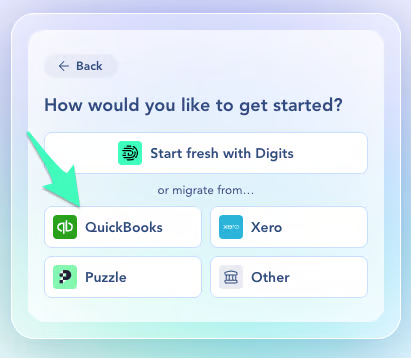
Next, we connected our bank accounts. You can also connect payroll, Bill.com, Stripe, and other financial systems right from setup. Within a few minutes, the AI had already sorted our transaction history and pointed us to a month that needed review.
Setting Up the Chart of Accounts
Your chart of accounts is the list of categories your finances get sorted into, like revenue, software, and rent. Digits will build one for you, or you can upload your own.
We let Digits build it, and it only created categories for transactions it had already seen. Since we’d only connected bank accounts, the list came out pretty thin, and we ended up adding accounts as we went. We did like that the categories are color-coded by type, which helps if accounting terms aren’t second nature to you. Adding one of Digits’ suggested accounts takes a single click.
Next time, we’d upload our own chart of accounts from the start, so everything’s organized on day one.
How QuickBooks Online Compares
QBO uses AI during setup too. It builds a business profile for you and suggests next steps, like connecting your bank and setting up invoices. You can watch the whole process in our QuickBooks Online setup walkthrough.
QBO’s chart of accounts wasn’t a perfect fit either, since it didn’t adjust to the industry we picked. Whichever platform you choose, we recommend importing a chart of accounts built for your business. Our free chart of accounts template is an easy place to start.
How Digits’ AI Changes the Bookkeeping Process
Here’s where the two platforms really part ways. Digits categorizes your transactions before you ever look at them, while QBO suggests a category and waits for you to confirm it. So the question isn’t only whether Digits does more of the work. It’s how Digits changes the work that’s left for you.
Automatic Transaction Categorization in Digits
When we opened our month in Digits, almost everything was already categorized, and a lot of it was right. It caught transfers between our accounts, put Stripe deposits in product revenue, and filed a QuickBooks fee under software. When Digits wasn’t sure about something, it flagged it as “low confidence,” which gave us an easy place to start.
Digits walks you through the month with a simple checklist: book transactions, reconcile, review the financials, and report. What you won’t find is a step to approve each transaction. Instead, you look over what the AI did and fix whatever’s off.
Reviewing and Correcting Transactions in Digits
We went through every transaction in the month, about two dozen total, and found several that needed correcting:
- Interest income was tied to an unrelated Relay account
- An owner draw was categorized as a shareholder loan, even though the transaction said “draw”
- A website fee ended up in uncategorized liabilities
- A transaction fee went to bank fees instead of payment processing fees
Fixing a single transaction was easy. The catch is that the change didn’t carry over to similar transactions, so the same website vendor showed up uncategorized three separate times. We asked the built-in Ask Digits chat what was going on. It explained that editing one transaction won’t update others from the same vendor. Digits may suggest similar transactions to update, but you decide whether to apply the change, and you have to click “apply” after each edit.
There’s also no way to mark a transaction as reviewed. With a couple dozen transactions, that wasn’t a big deal. With hundreds, you’d want your own system for keeping track of where you left off.
Automatic Vendor Creation and Duplicate Records
Digits creates vendors automatically, which saves time, but it also created duplicates. Intuit showed up twice, and Relay showed up three times.
The name on a bank transaction isn’t always the actual vendor. A purchase from an online store might come through as Stripe, and a bill paid through Bill.com might just say Bill.com. We’d like to see a way to review and approve new vendors before they’re added. That would keep your vendor records accurate as transactions grow and make it easier to spot one that doesn’t belong.
At least changing the vendor on a transaction is quick. It only takes a few clicks.
How QuickBooks Online Handles Transaction Review
QBO uses AI to suggest categories too, marked with a small star. The difference is that you look at each suggestion and confirm it yourself. Every account shows how many transactions are still waiting on you, and you can set up rules for vendors you see every month.
We always recommend tagging every transaction with a vendor or customer for cleaner reports. QBO flags any that are missing, and you can pull up your full vendor list anytime.
So with QBO, you’re confirming as you go. With Digits, more of that happens up front, but you still need to check its work.
Bank Reconciliation and Month-End Review
Reconciling means matching your books to your bank statement, so you know every transaction is accounted for and the balances line up.
What Happened When We Tested Digits’ Automated Reconciliation
Digits offers automated reconciliations. You upload your bank statements, Digits matches everything up, and you review anything it flags.
Digits didn’t pull statements from our bank, so we uploaded them ourselves. That’s where things got bumpy:
- In one month, it misread the statement’s closing balance
- In another, it used a starting balance that didn’t match the statement
- The screen listed transactions from other accounts, which made the real problem harder to find
Each issue was fixable. Once we corrected the balances, everything balanced, and a CSV upload of one statement worked well. Still, we expected the automated reconciliation to be smoother. We had to double-check and correct balances before we could finish.
How QuickBooks Online Compares
In QBO, you type in the statement’s ending date and balance yourself, and QBO selects the transactions that cleared. When everything flows in through the bank feed, it usually lines up without much effort. It’s not foolproof, though. In our month of bookkeeping in QuickBooks Online, a small credit never came through the feed, so we added it by hand. And a simple typo in the ending balance can send you hunting for a difference that isn’t really there.
QBO also has a books review, a checklist that flags loose ends like uncategorized transactions or accounts you haven’t reconciled yet.
No matter which platform you use, your bank statement has the final say. Automation doesn’t replace checking that ending balance yourself.
Reporting and Ask Digits
The ledger view quickly became one of our favorite parts of Digits. It lists every account on your balance sheet and income statement, along with every transaction that landed in each one. Click into something like owner’s draw or consulting revenue, and you can see exactly what’s in there. It’s a handy way to catch anything odd before you finalize your reports.
Ask Digits was the other highlight. The chat answered questions about our books and helped us use the platform better, like showing us where to set a custom date range on a profit and loss report.
Digits also has the standard profit and loss and balance sheet reports. QBO’s standard reports will feel familiar to most owners. We didn’t test a similar chat assistant in QBO.
Pricing and Value
Digits isn’t necessarily the cheaper choice. Its pricing is fairly close to QuickBooks Online’s, and it’s toward the higher end of the alternatives we’ve tested. So it comes down to whether its AI features make your bookkeeping easier to manage.
Still deciding between the two and leaning toward QBO? You can get started with QuickBooks Online here.
Should You Switch From QuickBooks Online to Digits?
Where Digits Has an Advantage
- Automatic categorization. The AI takes the first pass, so you’re not starting from scratch
- The ledger view. It’s easy to see what landed in each account
- Ask Digits. You can get answers about your books and the platform without leaving it
Where QuickBooks Online May Be a Better Fit
- Confirming as you go. You approve each transaction and always know what’s left
- Vendor control. You can see your full vendor list, and QBO flags missing vendors
- A familiar review process. You enter the statement balance yourself, and the books review catches loose ends
If you like the idea of AI doing the first pass and you have someone who’ll review its work carefully, Digits is worth a look. If you’d rather approve transactions as you go and keep a tighter handle on vendors, QBO may be the better fit. Whichever you pick, someone still needs to make sure your books are accurate.
More QuickBooks Online Alternatives We’ve Tested
- Xero vs. QuickBooks Online
- Kick vs. QuickBooks Online
- Count vs. QuickBooks Online
- FreshBooks vs. QuickBooks Online
- Puzzle vs. QuickBooks Online
Prefer to watch? The full series on YouTube covers setup and a month of bookkeeping for each platform.
Key Takeaways
- Even with Digits doing the first pass, our review turned up several miscategorized transactions
- Fixing one transaction in Digits won’t update similar ones unless you apply the change
- The automated reconciliation showed wrong starting or closing balances in two months, and we corrected them by hand
- The ledger view and Ask Digits were the most helpful features in our testing
FAQ
Yes. Digits lets you connect directly to QuickBooks Online during setup to bring your information over. We started with a fresh account in our testing, so we can’t say how smoothly a full migration goes.
Digits can automate parts of bookkeeping, but someone still needs to review the work. In our testing, we still had to correct transactions, clean up duplicate vendors, and fix reconciliation balances.
Yes. At Clara CFO Group, our support includes accounting system recommendations and help with implementation. We work alongside your bookkeeper and accountant, not in place of them.
If your business is growing and you need more than accurate books and financial reports, a fractional CFO may be a good next step. We help owners with cash flow planning, forecasting, and the bigger financial decisions that come with growth.
For more answers, visit our FAQ page.
Ready to Put a CFO in the Finance Seat?
Clara CFO Group is a boutique fractional CFO firm serving growth-stage companies generating $2M–$20M in annual revenue. We partner with CEOs who are ready to move beyond reactive financial management and install the financial leadership needed to scale with confidence.
Whether you’re running on EOS® and need a CFO who can fully own the finance function, or you’re looking for a strategic partner to guide financial planning, profitability, cash flow, and high-impact decision making, we’re here to help.
Our CFOs become an extension of your leadership team, providing the financial strategy, accountability, and insights needed to build a more profitable, scalable, and valuable business.
Schedule a Discovery Call to learn how Clara CFO Group can help you achieve your next stage of growth.
Affiliate disclosure: This article contains affiliate links that support Financial Tech Lab at no additional cost to you. This is not a sponsored post.